

SEO

La Refonte insights
A practical guide to moving a website without breaking your URLs, data or search visibility.
SEO
Refonte SEO
WordPress
A website migration means moving a site to a new host, a different domain, a new CMS or another architecture without losing URLs, data, forms, files, search rankings, analytics tracking, conversion capability or technical continuity during the switch.
As WordPress powers 42.5% of websites (source: W3Techs, 2026), the process must protect SEO before technical convenience. For a practical continuation, see WordPress sitemaps.
This guide is designed for managing a real migration: inventory, backup, staging, URL mapping, redirects, testing and post-migration monitoring. For a practical continuation, see PrestaShop Migration.
If your project combines a redesign, performance improvements and content migration, start by defining the scope of your WordPress website migration and check your structure with our guide to website architecture. This will help you avoid the classic mistake of treating migration as a simple server move when it also affects acquisition, conversion, tracking and maintenance.
4 useful benchmarks before you migrate
42.5%
of websites use WordPress (source: W3Techs, 2026)
53%
of mobile visits end when a page takes more than 3 seconds to load (source: Google, 2018)
1:1
target mapping between each old and new URL (source: Google Search Central, 2026)
30 days
minimum monitoring window after migration (source: Google Search Central, 2026)
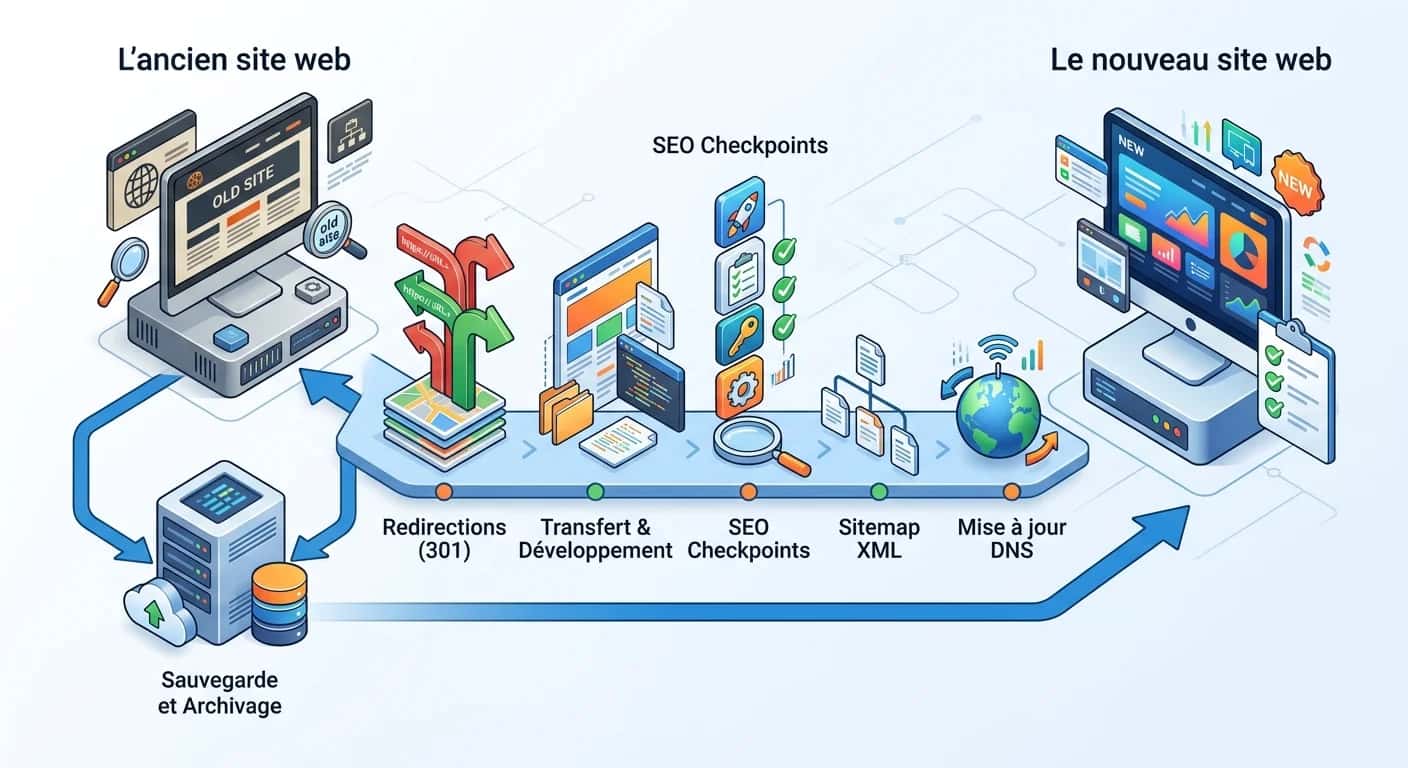
A migration does not merely change where your website lives. It changes what Google crawls, what visitors see, what your forms record and what your editorial teams publish. Our page on Ecommerce Website Redesign explains the next step.
Google recommends preparing the new site, mapping old URLs and testing thoroughly before launch (source: Google Search Central, 2026). Skip that phase and you put organic traffic, campaigns, leads and downloadable content at risk.
The true scope includes DNS, redirects, canonical tags, the sitemap, images, PDFs, forms, tracking scripts and, in some cases, product feeds and transactional emails.
Speed remains a major issue on mobile: Google reported that 53% of visits were abandoned when loading took longer than three seconds (source: Google, 2018). A migration that slows the site can therefore do real damage even when there is no visible SEO error.
If the project goes beyond a transfer and also involves performance work, treat it as a website migration with technical redevelopment, not a routine hosting move.
Imagine an industrial SME moving its brochure website to a new environment for greater stability. The homepage is not the greatest risk. To take this further, read Website Redesign Checklist.
The real risks lie in its expertise pages, contact forms, sales PDFs and pages that already rank. In this situation, speed is less important than aligning marketing, development and content, then defining the SEO implications through a SEO redesign process before launch day.
Étape 1
List active URLs, high-performing pages, media, forms, tracking scripts, downloads and technical access details. Without an inventory, you are working blind.
Étape 2
Decide whether you are moving to a new host on the same domain, changing domain, changing CMS or combining migration with a redesign. Each option carries different risks and requires different tests and redirects.
Étape 3
Create a testable environment with the future server, templates, database and content. The aim is to validate everything before touching production.
Étape 4
Prepare a table matching each old URL to its new destination, including images, PDFs, categories, deep pages and variants with or without a trailing slash.
Étape 5
Take a complete backup of both files and database. Immediately before the switch, freeze editorial updates to prevent the source and target sites from drifting apart.
Étape 6
Deploy, activate redirects, and check HTTPS, forms, high-traffic pages, the sitemap, canonicals and server response codes.
Étape 7
Review Search Console, logs, 404s, indexing, conversions and load times every week. A migration is judged after launch, not at the moment of deployment.
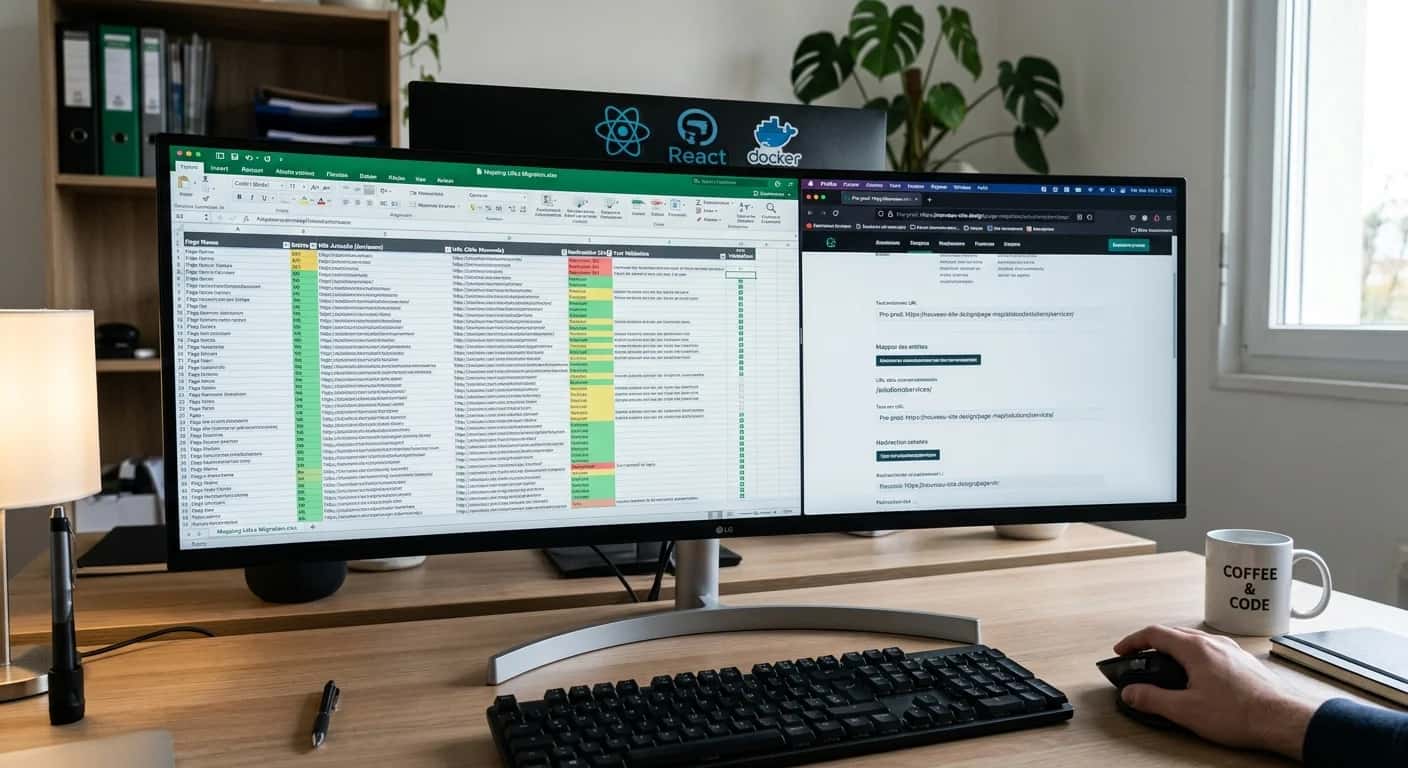
Google stresses one simple point: when URLs change, you need a clear map from the old format to the new one (source: Google Search Central, 2026).
This table must cover more than marketing pages. Include articles, categories, author pages, PDFs, referenced images, conversion pages, legal pages and every URL that receives traffic or links. If the existing site already ranks well, this step matters more than your choice of CMS.
Start by exporting URLs from your crawl, sitemap, Search Console and analytics.
Then add the assets that are often overlooked: downloadable files, tag pages, archives, subdomains, tracking parameters, print pages and redirects that are already in place. A migration often breaks the things nobody documented.
For a content-rich or WordPress website, our guide to WordPress migration adds useful detail to this inventory phase. If the site structure is changing, review your navigation in advance with an SEO-friendly website architecture.
Consider an SME moving to a different e-commerce platform. The risk is not limited to matching product page A with product page B.
You must preserve useful category pages that support internal linking, brand pages, rules for indexable filters, optimised images, delivery information and pages that have earned backlinks. When a page has no direct equivalent, redirect it to the page with the closest search intent, never automatically to the homepage. This discipline protects both user experience and the SEO authority built up over time.
| 01Migration type | 02SEO risk | 03Key concern | 04Priority test |
|---|---|---|---|
| 01Same domain, new host | Moderate | DNS, HTTPS, forms, server performance | Crawl of key pages and conversion tests |
| 02New domain | High | 301/308 redirects, Search Console, backlinks, brand | Source URL → target URL table |
| 03New CMS | High | Templates, tags, images, structured data, pagination | Page-by-page comparison of the old and new sites |
| 04Migration and redesign | Very high | Combines SEO, UX, content and tracking | Complete staging site and cross-team acceptance testing |
| 05E-commerce | Very high | Products, categories, basket, payment, emails | Complete checkout journey and deep pages |
Same domain, new host
New domain
New CMS
Migration and redesign
E-commerce
For large websites, Google recommends moving in separate stages where technically possible. This makes it easier to observe the effect on crawling and traffic before extending the migration (source: Google Search Central, 2026).
A phased approach reduces risk when you have many templates, thousands of URLs or complex environments. For a small SME brochure site with few pages and a tidy structure, by contrast, a single switch may be clearer and easier to monitor.
A big-bang migration can work when the site is small or medium-sized, the mapping is sound, redirects are ready, acceptance testing has been thorough and everyone can be available at the same time.
It avoids running two editorial environments in parallel and limits inconsistencies. It is often the right format for a controlled WordPress website migration with few external dependencies and a well-documented content inventory.
A phased migration becomes preferable when several page families, multiple languages, a large blog or business-critical integrations are involved.
You can migrate one section, measure the results, make corrections and then move on to the next. It is less dramatic, but better at safeguarding existing SEO. It is also more suitable for projects involving a broader product or technical team, particularly a website migration with bespoke development.
The most practical intent behind this search often concerns the actual transfer to a new hosting provider. This is where many teams break their site: files are out of sync, the wrong database is used, DNS is switched too soon or there is no rollback plan.
The correct order is straightforward: clone the files, restore the database in staging, check environment variables, test media and forms, then prepare the DNS change only after acceptance testing has passed. Until this entire path has been tested from end to end, you are not ready to switch.
With a CMS, you must move uploads, images, PDFs, exports and sometimes directories generated by extensions, while also checking write permissions. A working homepage is not sufficient proof: deep pages, older images and forms often reveal what has been missed.
After importing, check absolute URLs, internal links, media and application settings. In WordPress and other CMSs, serialised fields or database settings can break silently if URLs are replaced incorrectly. Check administrator accounts, email settings and plugins that depend on the domain as well.
Change DNS after acceptance testing, never before. Reduce the TTL where possible, centralise DNS access, record the old configuration and prepare a list of immediate checks: homepage, key commercial pages, sitemap, robots.txt, HTTPS, forms and redirects. If the domain is changing at the same time, add Search Console checks and page-by-page redirects.
A realistic rollback plan cannot be left until later. Decide who has the authority to roll back, what error threshold triggers the decision and how the old site, database and DNS configuration will be restored quickly. A short checklist is enough: verified backup, old version available, server access tested, rollback window defined and a log of launch-day changes. This plan prevents you from remaining stuck with a broken production site simply because nobody is prepared to reverse the move.

The staging environment must be credible. It needs the same strategic content, templates, critical scripts, planned redirects and navigation logic as the target site.
Google advises testing the new site thoroughly before migration (source: Google Search Central, 2026). If your test environment is only a partial mock-up, you will discover the real bugs in production: silent forms, lingering noindex tags, broken links or missing media.
The longer the project lasts, the greater the risk of divergence between source and target. An article published the day before launch, a last-minute service-page edit or an image replaced after export creates immediate technical debt.
The sensible approach is to announce an editorial freeze just before the switch, then replicate any essential remaining updates precisely. If your team is managing a redesign, SEO and performance at the same time, have both a technical specialist and an acquisition specialist approve the acceptance tests. SEO oversight for your website migration significantly reduces the risk of invisible omissions.
Test what generates revenue or trust first: pages that attract traffic, pages that convert, forms, PDF downloads, internal search, the basket for e-commerce sites and analytics tracking.
Then check HTTP status codes, canonical tags, metadata, breadcrumbs, structured data and the sitemap. Acceptance testing does not need to be theatrical; it needs to be unforgiving. One mishandled page template can create the same defect across hundreds of URLs after launch.
The first mistake is believing that an export and import are enough. The second, almost as common, is leaving temporary blocking directives in place when the site goes live.
Google explicitly identifies forgotten noindex tags, robots.txt blocks and misconfigured redirects as common site-migration problems (source: Google Search Central, 2026). These mistakes are routine, which is precisely why they should be mandatory checkpoints rather than minor technical details.
Redirecting everything to the homepage, forgetting PDFs, launching a new site structure without retaining useful categories, keeping absolute links to the old domain or breaking tracking parameters are costly shortcuts.
They create friction for visitors and make the site harder for Google to understand. Even when traffic holds steady, conversions can fall if forms, calls to action or transactional emails have not been tested properly. On mobile, perceived speed remains critical to confidence and enquiries (source: Google, 2018).
Treat every risk as a measurable check: redirects validated, key pages accessible, sitemap submitted, Search Console connected, logs monitored and conversions verified.
This discipline only feels burdensome when it has not been planned. Once the migration table is in place, you know what to test, what to correct and who to involve. That is exactly what separates an improvised migration from a properly managed one.
A migration is not complete simply because the site returns a 200 response. It is complete when Google understands the new scope, old URLs resolve correctly and your conversion data remains consistent.
Google explains that temporary fluctuations may occur after URLs change and recommends monitoring crawling, indexing and traffic for both the old and new sites (source: Google Search Central, 2026). This monitoring phase should be built into the original schedule.
During the first week, monitor 404s, redirect chains, strategic pages, forms and Search Console.
In week two, look at actual indexing, queries, impressions and excluded pages. Over the following weeks, compare conversions, engagement rates and the behaviour of your most valuable pages. If you change everything during this period, diagnosis becomes impossible.
The purpose of monitoring is to distinguish a normal adjustment period from a genuine migration defect. Our page on prestashop to shopify migration explains the next step.
The most common trap is treating an initial fall or period of stability as conclusive evidence.
A migration can appear sound for several days before omissions become visible: PDFs without redirects, deep pages with incorrect canonicals, missing images, forms that do not deliver, or blog pages absent from the sitemap. Keep the process simple: fix what is broken, document what changes and avoid another major SEO change until the migration has stabilised.
This is the most reliable way to protect your traffic over the long term. For a practical continuation, see prestashop redesign.
Crawl, Search Console export, and lists of content, media, forms, scripts and technical access details.
Build the target site, prepare the redirect map, test templates and approve critical pages.
Complete backup, pause sensitive editorial changes and approve the switch plan.
Deploy, activate redirects, verify HTTPS, and test key commercial pages and tracking.
Review 404s, logs, Search Console, forms, downloaded files, deep pages and server performance.
Analyse excluded pages, impressions, queries and any changes in conversions.
Resolve remaining anomalies, complete the documentation and prioritise post-migration improvements.

Last updated: April 2026
We can define the switch plan, safeguard your redirects, review the staging site and manage the SEO checks that prevent traffic loss and technical oversights.
Keep exploring



A project in mind?
Start with a free audit grounded in your goals, website and data.
Discutons de votre projet
30 min · Google Meet
Choisissez le créneau qui vous convient dans notre calendrier. On analyse votre situation avant l’appel pour aller droit au but.
Finding available times...