SEO

La Refonte insights
WordPress powers 41.2% of the websites measured by W3Techs in August 2026. This guide connects permalinks, indexing, Core Web Vitals, content and SEO/GEO measurement.

SEO

WordPress
Audit SEO
You can improve the basic WordPress settings yourself: permalinks, indexing, sitemap and metadata. Build internal capability if the team wants to manage technical SEO, content and measurement over time. Delegate when the website is complex, a visibility loss needs diagnosis or delivery time is missing. The table below helps assign responsibility.
WordPress SEO covers the techniques used to improve a WordPress website's organic visibility. It combines technical settings, content structure, speed and the configuration of an SEO plugin.
According to W3Techs, WordPress powers 41.2% of all websites as of 11 August 2026. Its popularity does not make the CMS high-performing by default. Poorly planned permalinks, blocked indexing or two competing sitemaps can hinder crawling before any content is written.
Visibility is no longer only about ranking well. A page may also be quoted or cited in an AI-generated answer. Our guide to SEO and GEO for Google and AI systems explains this second challenge. Technical foundations make content accessible; factual clarity and structure then help systems interpret it.
The approach here is practical: every check can be carried out in WordPress, PageSpeed Insights or Search Console. Start with the blockers, establish a baseline and change one setting at a time.
The most common question is 'Where should I start?' The answer is not Yoast. Before installing a plugin, fix the basic settings or everything built on top of them will be fragile.
This is the order that works, based on dozens of website redesigns at La Refonte:
/%postname%/ or /%category%/%postname%/. Never use ?p=123.This sequence avoids a familiar trap: installing four conflicting SEO plugins before fixing the permalinks. Otherwise, you can spend weeks treating symptoms instead of the underlying cause.
The method stays the same, but ownership changes according to the expertise available. Assign every action before adding more plugins or suppliers.
| 01Handle internally | 02Build internal capability | 03Delegate |
|---|---|---|
| 01Permalinks, indexing, sitemap, metadata and Search Console checks | SEO/GEO method, content prioritisation and internal data review | Technical audit, strategy, production, authority building and reporting |
| 02Apply the six-step method | Use our SEO and GEO case studies | Request an SEO audit |
Permalinks, indexing, sitemap, metadata and Search Console checks
SEO rests on three pillars, whatever the CMS. WordPress is no exception, although each pillar takes a particular form on the platform. For a practical continuation, see WP Rocket.
This is the foundation. A slow or poorly indexed WordPress website with unreadable URLs will struggle to rank, regardless of its content. Technical SEO covers crawling and indexing (robots.txt, sitemap.xml and canonical tags), speed and Core Web Vitals, URL structure, HTTPS, structured data and mobile-first design. This is where WordPress tends to accumulate the most hidden debt: poorly coded plugins, themes that load 15 fonts and databases that have never been cleaned.
Content must satisfy search intent. In WordPress, that means structuring each article with an H1, properly nested H2 headings, coherent internal links and targeted keywords in the metadata. An SEO plugin such as Rank Math provides a readability score, but that is only an indicator, never the objective. For more advanced work, semantic optimisation can help cover the full vocabulary Google expects for a search query.
Google assesses your website's authority partly through the links pointing to it. WordPress makes internal linking straightforward through categories, tags and related articles, but acquiring external links remains an editorial and relationship-building exercise outside the CMS.
40.7%
of all websites use WordPress (W3Techs, 23 August 2026)
2.5 s
maximum recommended LCP threshold (Core Web Vitals, source: web.dev)
200 ms
recommended INP threshold for responsiveness (Core Web Vitals)
0.1
CLS threshold for visual stability (Core Web Vitals)
The same issue appeared in three recent WordPress audits I carried out: the website was misconfigured at a fundamental level and no plugin could compensate for it. Check these critical settings now.
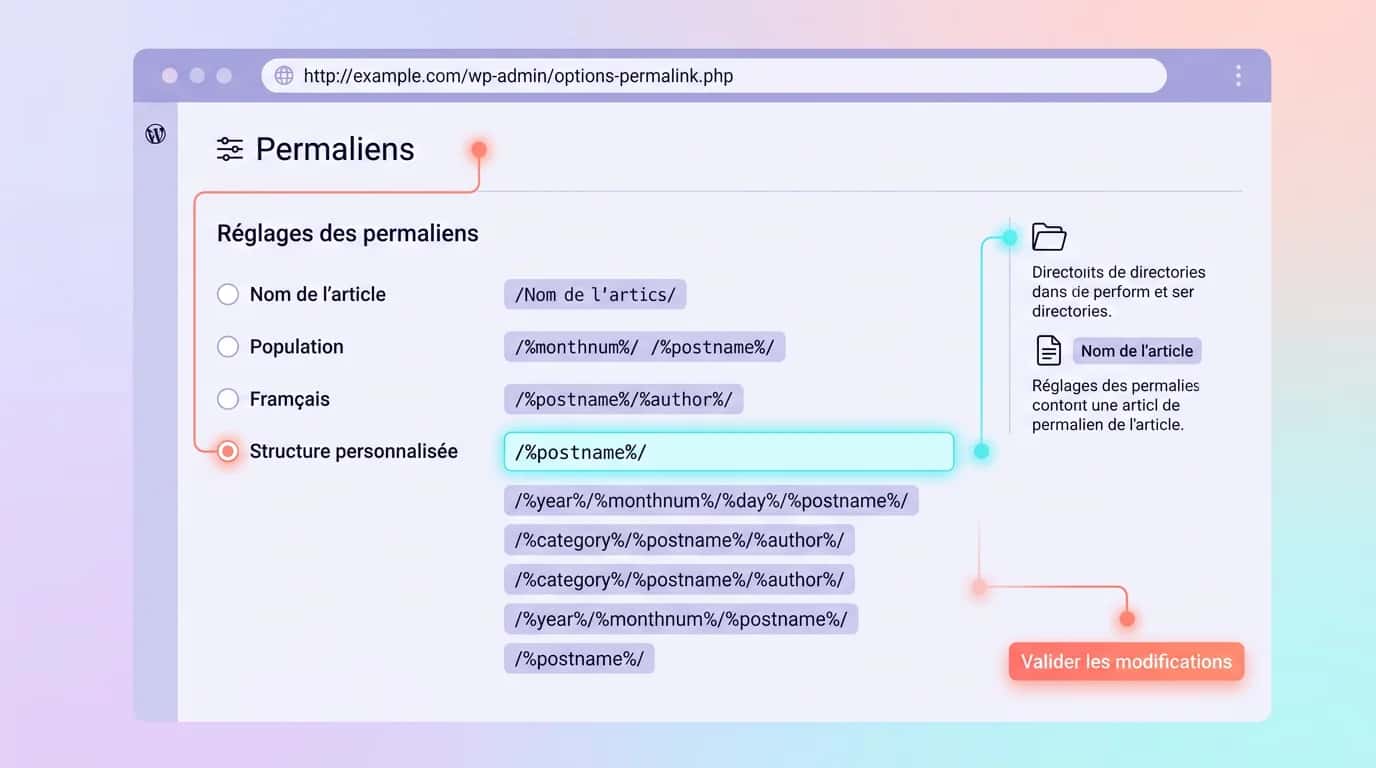
Go to Settings → Permalinks. Choose 'Post name' or 'Custom Structure' with /%category%/%postname%/. Avoid numeric permalinks: they contain no keyword context, and changing them later will break your URLs.
Under Settings → Reading, make sure 'Discourage search engines from indexing this site' is unticked. This is the leading cause of WordPress websites remaining invisible on Google after launch.
The site title under Settings → General is NOT the SEO title. Use an SEO plugin to define a template for each content type, including the home page, pages, posts and categories. A poor template can generate 5,000 identical titles at once.
WordPress has generated a native sitemap since version 5.5 (/wp-sitemap.xml). If you use Rank Math or Yoast, disable the native sitemap to avoid duplication. The default robots.txt is acceptable; never block /wp-content/, as doing so prevents Google from loading CSS and JavaScript.
For the detailed performance method, continue with our Core Web Vitals guide.
The Smartwag SEO and GEO study connects a dated technical check with Search Console results observed across a fixed scope. It publishes the screenshots, dates and interpretation limits without attributing all traffic to one WordPress setting.
If your team wants to apply this level of method internally, use the SEO and GEO case studies to connect research, technical checks, content and AI visibility. The SEO audit workspace can retain audits and priorities. When time or expertise is missing, the agency can take responsibility for analysis and delivery.
Once the technical foundations are in place, every published article should follow an SEO checklist. Without one, even high-quality content may struggle to rank.
Choose a keyword with measured search volume using Ahrefs, Semrush or Google Keyword Planner. Review the search results: which formats dominate, such as guides, comparisons or lists, and which questions appear in People Also Ask? This should shape the article's structure.
| 01Plugin | 02Free version | 03Strengths | 04Limitation |
|---|---|---|---|
| 01Rank Math | Yes (5 focus keywords by default) | Modern interface, native structured data, 404 module and integrated Google Analytics | Some features push the PRO version aggressively |
| 02Yoast SEO | Yes | Extensive documentation, mature and widely used plugin | Dated interface and frequent upselling |
| 03SEOPress | Yes | Made in France, GDPR-friendly and no advertising in the admin area | Smaller community and fewer tutorials |
| 04The SEO Framework | Yes (unlimited) | Lightweight, no advertising and well suited to developers | Spartan interface and no SEO dashboard |
Rank Math
Yoast SEO
SEOPress
The SEO Framework
The plugin matters less than its configuration. A properly configured Yoast installation will outperform Rank Math left on its default settings. Here is my honest assessment after installing all four on client websites.
The free version of Rank Math is sufficient and modern, with native structured data for organisations, breadcrumbs and articles. Its official documentation states that the free version supports five focus keywords by default. A developer filter can add more, although keeping one primary topic is preferable.
Choose Yoast or SEOPress. Yoast is the established option with a very large community. SEOPress is a strong choice for organisations in France that care about digital sovereignty and GDPR compliance.
Choose The SEO Framework. It is lightweight, has no upselling and handles the essentials without cluttering the admin area.
Never run two SEO plugins at the same time. They can generate two SEO titles, two descriptions and two sitemaps. Google may then choose one arbitrarily and ignore your intended settings.
The same causes recur in audits of WordPress websites that 'do not rank despite every Yoast light being green'. Here is how to identify them in less than ten minutes.
Search Google for site:votredomaine.fr. If you see no results, or far fewer than the number of pages on the website, something is blocking indexing. Check Search Console → Coverage and inspect robots.txt at /robots.txt.
Test the website with both PageSpeed Insights and GTmetrix. They report different figures because they use different testing methods. Treat the mobile PageSpeed result as the primary benchmark because it is the one Google uses.
Use the Schema.org validator or Google's Rich Results Test. A misconfigured plugin can generate errors that prevent rich results from appearing.
Open /sitemap_index.xml or /wp-sitemap.xml. Make sure it lists your pages, articles and categories. If a content type is missing, review the SEO plugin settings.
We carry out a technical audit covering indexing, speed, structure and content, then provide a prioritised action plan. We recommend either a redesign or targeted optimisation according to the expected gains, not our own preferences.
SEO cannot be managed without measurement. Three tools are enough to monitor a WordPress website's organic search performance. Our page on How to Test Your Website's Performance explains the next step.
It is free and indispensable. It shows the queries generating clicks, average rankings, indexing errors and Core Web Vitals measured from real traffic through CrUX data. Configure it as soon as the website launches. For a detailed introduction, see our article about an SEO audit.
Use it to measure organic traffic, bounce rate and conversions. GA4 is powerful but complex. Plausible and Fathom are excellent GDPR-friendly alternatives.
Use Ahrefs, Semrush or Ubersuggest to track rankings and analyse competitors. The free Ahrefs Webmaster Tools plan is enough to get started.
Review Search Console once a week, GA4 once a month and rankings fortnightly. No more than that. Checking rankings every day does not change the strategy and wastes time.
No WordPress configuration can compensate for poor content or an oversaturated market. If you target searches such as 'car insurance' or 'credit consolidation', technical optimisation alone will never be enough to compete with organisations investing millions in backlinks and editorial content produced by teams of 20 writers.
For most SMEs targeting local, specialist or niche keywords, a well-optimised WordPress website combined with regular content can be enough to reach the top three results within 3 to 9 months. This is where technical and editorial WordPress SEO delivers the strongest return.
There is another honest limitation: SEO is never finished. Google changes its algorithm several times a year, and a ranking must be defended through fresh content and technical maintenance. A website left untouched for six months will inevitably lose ground, even if it was well built at launch.
Last updated: 24 August 2026
Keep exploring

A project in mind?
Start with a free audit grounded in your goals, website and data.
Discutons de votre projet
30 min · Google Meet
Choisissez le créneau qui vous convient dans notre calendrier. On analyse votre situation avant l’appel pour aller droit au but.
Finding available times...