

Maintenance

La Refonte insights
Your web host affects your site's speed, SEO and security. Compare the best hosts in France, seven selection criteria and mistakes SMEs should avoid in 2026.
Maintenance

SEO

Refonte
Your website runs on servers you never see. Yet this quiet technical choice determines its loading speed, Google visibility and data security. For an SME, choosing the right web hosting is not a minor decision.
This guide covers the available hosting types, providers worth considering in France, selection criteria suited to SMEs and the classic mistakes that cost customers before they have read a word of your website. Whether you are starting from scratch or planning to move an existing site, it gives you the practical information needed to decide.

A web host is where your files, database and emails live around the clock. When someone types your address into a browser, your hosting responds. The faster that response, the better for visitors and Google.
The figures are clear: Google data shows that 53% of visitors leave a mobile page if it takes more than three seconds to load. This remains true in 2026, and expectations have only risen as faster connections have become common.
Google measures server response speed through TTFB, or Time to First Byte. Slow hosting harms Core Web Vitals, the metrics that directly influence your position in search results. If your TTFB regularly exceeds 600 ms, better-hosted competitors gain ground without doing anything else.
Our complete guide to Core Web Vitals explains the relevant metrics, the thresholds to meet and the tools for measuring current performance.
A good host guarantees uptime of at least 99.9%, meaning less than nine hours of downtime a year. A mediocre 99% uptime already means 87 hours a year when your site is unavailable, sales are blocked and your reputation suffers.
Security includes an SSL certificate for HTTPS, application firewalls, DDoS protection and automatic daily backups. These features are not luxuries: they protect customer data and your GDPR compliance.
The hosting market offers four main formats. Each meets different needs depending on the size of your website, budget and technical expertise.
With shared hosting, your website shares one server's resources with tens or hundreds of other sites. It is the most affordable option, usually costing €3–€10 a month, and works well for brochure sites, blogs and small online shops with moderate traffic.
There are limits: if a neighbouring site consumes too many resources, yours suffers. Storage and bandwidth are constrained, while standardised server configurations leave little room for technical customisation.
A VPS, or Virtual Private Server, allocates dedicated resources to you on a shared physical server. You gain the power of a semi-private server for €10–€40 a month, with more flexible configuration and steadier performance.
It suits websites with rising traffic, web applications and medium-sized online shops. You need some technical expertise or a provider to manage it.
With a dedicated server, you rent an entire physical machine and all its resources. Prices start at around €80–€100 a month and can exceed €300 depending on the configuration.
This is the option for high-traffic websites, SaaS platforms and online shops receiving several hundred thousand visits a month. It is oversized for the great majority of SMEs.
Cloud platforms such as AWS, Google Cloud, Azure and Scaleway charge according to use. You pay for exactly what you consume, with no excess capacity. Scaling is automatic, so if traffic triples on a peak day, resources rise without intervention.
Cloud hosting suits variable traffic, seasonal applications and start-ups anticipating rapid growth. It is more technical to manage and poor configuration can make costs unpredictable.

Several strong providers operate in the French and European hosting market. Here is a comparison of the options best suited to SMEs, based on four essential criteria.
| Host | Type | Starting price | French/EU servers | Support | Strength |
|---|---|---|---|---|---|
| o2switch | Shared | €7.99/month | France | 24/7 | One unlimited plan |
| Infomaniak | Shared / VPS | €5.75/month | Switzerland | 7 days a week | Environmentally responsible, strict GDPR policy |
| OVHcloud | Shared / VPS / dedicated | €2.99/month | France | Tickets, telephone | Complete range, aggressive pricing |
| Hostinger | Shared / VPS / cloud | €2.49/month | Lithuania / EU | 24/7 chat | Highly competitive prices |
o2switch is often cited as the benchmark for French SMEs. Its single fixed-price package simplifies the choice: one plan, generous resources and telephone support based in France. It suits businesses seeking dependable hosting without technical management.
Infomaniak stands out for its environmental commitments and rigorous privacy policy. Its servers are in Switzerland and subject to Swiss law, which may reassure SMEs concerned about data sovereignty. Its support is well regarded.
OVHcloud is Europe's major player. It has a very broad range and some of the market's lowest prices. Support is less personal, but documentation is thorough and the community active. It suits SMEs with in-house technical expertise.
Hostinger has matured in recent years. Its introductory prices are extremely aggressive, with frequent promotions. The platform is intuitive and chat support responsive. Watch the renewal terms: the starting price is often a first-year promotion.
Beyond comparison tables, these seven practical criteria should guide your decision.
Free options include WordPress.com, free Wix, GitHub Pages and InfinityFree. They can be useful for personal projects and tests. For a professional site, the drawbacks far outweigh the benefits.
A free host makes money elsewhere. Third-party adverts may appear on your site without permission. Your address is a subdomain such as yourbusiness.wordpress.com rather than your own domain, damaging credibility and search visibility. Storage is limited, advanced features are locked and support is absent or paid.
Performance is often inadequate for professional use. Servers divide resources between vast numbers of users, leading to unpredictable loading times.
As soon as a site represents your company, captures leads or sells products, paid hosting becomes essential. A budget of €5–€15 a month is enough for dependable, fast and GDPR-compliant shared hosting.
For an online shop with several hundred products, allow €15–€30 a month for a VPS or basic cloud hosting. That is a fraction of the revenue lost to slow speeds or outages.
These ranges exclude the domain name, usually €10–€15 a year. Allow extra for advanced security or a CDN if your audience extends internationally.

Changing hosts can feel daunting. The good news is that a rigorous process makes the migration invisible to visitors.
Most hosts provide automated migration tools, particularly for WordPress: Duplicator, All-in-One WP Migration or the new host's migration assistant. Our complete WordPress migration guide explains manual and plugin-based methods, including checks at each stage. These tools transfer files and databases within minutes.
Once the site works on the new host, do not change DNS yet. First use your computer's hosts file to point temporarily to the new IP address. Check every page, form and, for an online shop, every transaction.
Only after everything is approved should you change DNS records at the registrar. Propagation takes one to 24 hours depending on the TTL. Keep the old hosting active for at least 72 hours after the move to ensure all traffic has switched.
For a post-migration performance audit, our website performance testing guide provides the relevant tools and thresholds. Also run a complete website analysis to check that the migration introduced no technical regressions.
Poor hosting does more than lose visitors: it actively erodes SEO performance over time.
Googlebot crawls your site with a limited budget. If the server responds slowly, the bot visits fewer pages on each pass and content takes longer to index. A high TTFB harms LCP, or Largest Contentful Paint, a Core Web Vitals metric built directly into the ranking algorithm.
An underpowered host, especially cheap shared hosting, can jump from 100 ms to two seconds of TTFB under load. Our Core Web Vitals guide explains how to diagnose and fix these problems.
Whenever Google requests a page and receives a 503 Service Unavailable error, it records the event. Repeated downtime sends a negative signal about reliability. Google may crawl less often or temporarily demote pages.
Monitor uptime with free tools such as UptimeRobot or Better Uptime. If your site goes down more than once a week, it is time to change hosts.
Every modern browser marks an HTTP website with no SSL certificate as 'not secure'. Google has penalised HTTP sites since 2014. In 2026, no serious host should deliver a site without active SSL. Its absence is a warning sign.
If visitors are in France and servers in the United States, every request travels thousands of kilometres, adding an unavoidable 100–200 ms of latency. For a French or European audience, servers in France or the EU consistently perform better.
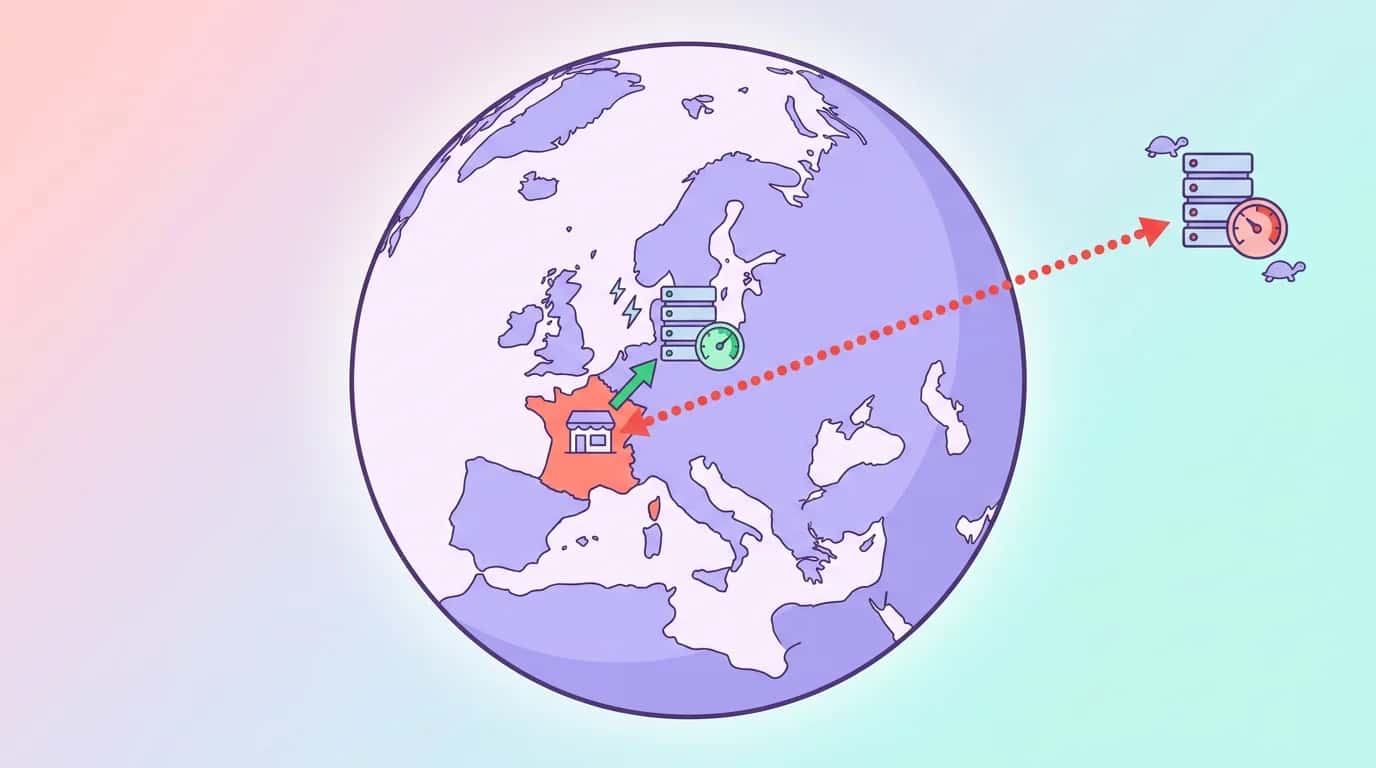
Server location also affects GDPR compliance. Storing European users' data outside the EU creates additional obligations for international data transfers. Choosing a host with French or European data centres simplifies regulatory compliance.
On cheap shared hosting, the 'noisy neighbour' effect can be severe. If another site on your server launches a marketing campaign and receives a traffic spike, your own response times may deteriorate through no fault of your own.
This risk is particularly damaging during critical periods such as sales, product launches and email campaigns. Moving up to a VPS or cloud hosting isolates your resources and avoids this uncertainty.
To monitor infrastructure health over time, our website maintenance guide will help you establish routine checks and anticipate problems before visitors feel them.
Updates, security and monitoring: we look after your site so you can focus on the business.
Keep exploring



A project in mind?
Start with a free audit grounded in your goals, website and data.
Discutons de votre projet
30 min · Google Meet
Choisissez le créneau qui vous convient dans notre calendrier. On analyse votre situation avant l’appel pour aller droit au but.
Finding available times...