

Audit SEO

La Refonte insights
Is your website slow, losing rankings and driving visitors away? Core Web Vitals may hold the answer. Learn how these performance metrics affect SEO and how to improve them.
Audit SEO

SEO

Refonte
Your website takes five seconds to load. Images jump around the screen. Buttons do not respond as soon as they are clicked. The result: visitors leave before they have even seen what you offer, and Google pushes you down to page two.
Thousands of websites face this problem because they ignore Core Web Vitals. Introduced by Google in 2021, these three metrics measure your users' real-world experience. Poor scores mean poorer search visibility. It is that simple.
In this guide, we break down each metric, show you how to measure it and, most importantly, explain how to improve it. Whether you can optimise the website yourself or need a complete website redesign, you will know exactly where you stand.
Core Web Vitals are a set of metrics defined by Google to assess the quality of a website's user experience. They answer three fundamental questions:
1. Does the website load quickly? This is LCP (Largest Contentful Paint). It measures how long it takes for the page's main content to appear.
2. Does the website respond immediately to user input? This is INP (Interaction to Next Paint). It measures how quickly the website responds to clicks, taps and keyboard input.
3. Does the content remain visually stable? This is CLS (Cumulative Layout Shift). It measures unexpected movement of page elements during loading.
These three metrics are not abstract technical indicators. They reflect what visitors actually experience as they browse your website. If a customer sees the "Buy" button move just as they click it, or has to wait four seconds for your homepage to appear, you have lost that customer.

LCP measures perceived loading speed. More precisely, it marks the point at which the largest visible element on the page, often a hero image or a block of text, appears on screen.
Imagine a prospect searching Google for "website redesign cost" and clicking your article. LCP is the time between that click and the moment they can see genuinely useful content. Not a loading spinner. Not a blank page. Real content.
A good LCP should be under 2.5 seconds. Beyond four seconds, Google considers the experience poor.
INP replaced FID (First Input Delay) in March 2024. It measures your website's overall responsiveness to user interactions. For a practical continuation, see How to test your responsive website.
The principle is simple: when a visitor clicks a button, types on their keyboard or uses an interactive element, how long does the page take to respond visually? A website that freezes for 500 ms after a click feels unbearably slow.
The target is to stay below 200 milliseconds. Above 500 ms, users perceive the website as slow and unprofessional.
CLS measures visual stability. It captures that familiar problem where you start reading a paragraph and everything suddenly moves down because an advert or image has just loaded.
Here is a practical example: you are browsing an ecommerce website and are about to click "Add to basket" when a banner appears at the last moment. You click "Subscribe to the newsletter" instead. Frustrating, isn't it?
CLS should remain below 0.1. Google considers a score above 0.25 poor.
| 01Metric | 02Good | 03Needs improvement | 04Poor |
|---|---|---|---|
| 01LCP (loading) | ≤ 2.5s | 2.5s - 4s | > 4s |
| 02INP (interactivity) | ≤ 200ms | 200ms - 500ms | > 500ms |
| 03CLS (stability) | ≤ 0.1 | 0.1 - 0.25 | > 0.25 |
LCP (loading)
INP (interactivity)
CLS (stability)
Google wants users to find relevant answers on websites that are pleasant to use. If the first search result takes six seconds to load and everything moves around, the user will return to Google and choose another result. That is bad for everyone.
Core Web Vitals have formed part of Google's ranking signals since May 2021. They are far from the only factor, but when two websites are equally relevant, the one with better Core Web Vitals will have an advantage.
Google has also integrated these metrics into several of its tools, including Search Console, PageSpeed Insights and Chrome DevTools. The message is clear: performance is no longer optional.
For an ecommerce website or a lead-generating company website, the stakes extend beyond SEO. An internal Google study found that a 0.1-second improvement in loading time increased conversions by 8%. For a website generating €100,000 in annual revenue, that is an additional €8,000, simply from improving performance. If you lack the resources in-house, an SEO agency can audit and improve your Core Web Vitals.
If you have already commissioned a website audit, you will know that technical performance is one of the first areas examined. Core Web Vitals are the condensed, official version of that analysis. If you also want search engines to crawl slow or newly published pages more reliably, our guide to WordPress sitemaps is a useful complement to the diagnosis.
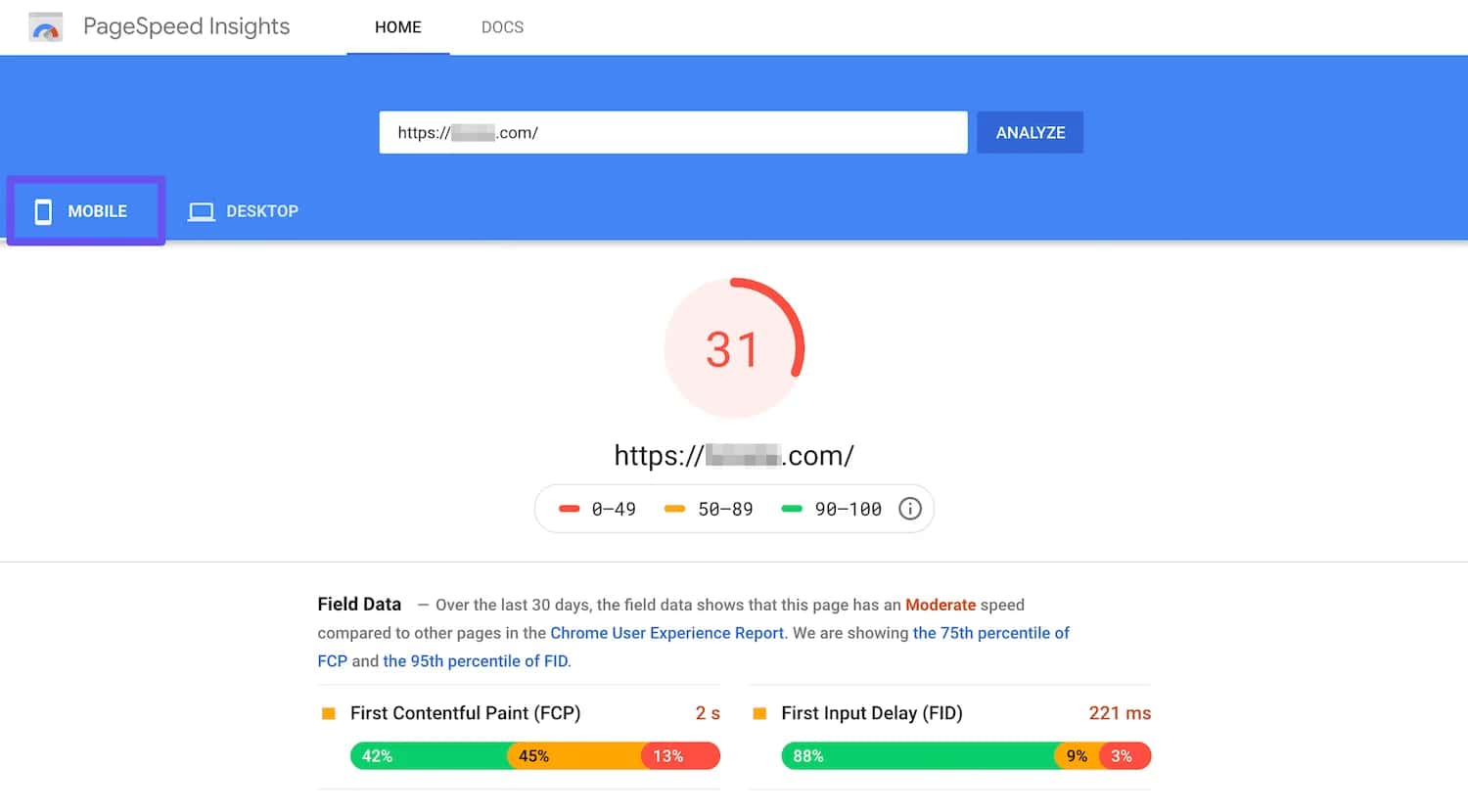
Measuring is useful. Understanding what you are measuring is even better. There are two types of data: lab data, from simulated tests, and field data, from real users.
Lab data: These tests run under controlled conditions, using a standardised connection and simulated device. They are useful for diagnosis and optimisation, but do not reflect the experience of your actual visitors.
Field data (CrUX): These metrics are collected from real Chrome users who visit your website. This is the data Google uses for ranking, so it is the most representative view of real-world performance.
A slow LCP is often caused by unoptimised images, a slow server response or resources that block rendering. These are the main areas to address:
Optimise your images. Images often account for 50% of a page's weight. Use modern formats such as WebP and AVIF, compress the files and specify explicit dimensions. A 3 MB hero image on your homepage is a crime against LCP.
Improve server response time (TTFB). If your server takes two seconds to respond, a good LCP is impossible. Solutions include a CDN, caching, better hosting and optimised database queries. Our page on Web Hosting explains the next step.
Remove render-blocking resources. JavaScript and CSS loaded synchronously delay the page display. Defer anything that can wait, inline critical CSS and lazy-load the rest.
Use preloading. The preload attribute tells the browser to prioritise certain resources, such as fonts and LCP images. Saving 500 ms on LCP can sometimes be as simple as adding one line of code.
INP measures responsiveness. A poor INP usually means JavaScript is monopolising the browser's main thread and making the interface unresponsive.
Reduce JavaScript. Every kilobyte of JavaScript has to be parsed, compiled and executed. Remove dead code, split your bundles and lazy-load non-critical features.
Avoid long tasks. A JavaScript task that takes more than 50 ms blocks the main thread and prevents the browser from responding to interactions. Break up long tasks with yield() or requestIdleCallback.
Use Web Workers. Move computationally intensive processing into a Web Worker so the main thread remains available for interactions.
Optimise event handlers. An onclick handler that triggers 200 synchronous operations will produce a disastrous INP. Detach anything non-essential and use asynchronous patterns.
A WordPress website with 47 plugins, each loading its own JavaScript? That is an ideal candidate for a performance-led WordPress redesign. To take this further, read WP Rocket.
CLS is the easiest metric to understand and often the easiest to fix. The problem comes from elements with no reserved dimensions that push other content aside when they load.
Always specify image and video dimensions. The width and height attributes allow the browser to reserve space before loading. No dimensions means a layout shift is almost guaranteed.
Reserve space for adverts and embeds. Adverts that suddenly appear and move all the content are a CLS nightmare. Use fixed-size containers.
Avoid inserting content above existing content. A cookie banner that appears at the top of the page and pushes everything down causes a shift. Prefer banners at the bottom or overlays that do not move other elements.
Load fonts correctly. Replacing a system font with a custom font after two seconds can cause a shift. Use font-display: swap and preload your fonts.
CLS is often a symptom of rushed development and a lack of attention to detail. A well-planned redesign accounts for these constraints from the design stage.
Optimising an existing website makes sense, but sometimes the technical debt is so severe that every improvement costs more than the last. The code is a house of cards, the WordPress theme dates from 2015 and the plugins are fighting one another.
These are the signs that a redesign will deliver better value than further optimisation:
Your website is more than five years old and has never undergone a technical overhaul. Web standards evolve quickly. A website built in 2019 without any structural updates is probably using outdated practices.
Core Web Vitals remain in the red despite several optimisation attempts. If you have already compressed the images, added a CDN and optimised caching, but the scores are still poor, the problem is structural.
The website is not responsive, or the mobile code is a makeshift layer added on top. Google uses mobile-first indexing. A website that performs poorly on mobile is hit twice, with both poor Core Web Vitals and poorer rankings.
The architecture prevents the necessary improvements. Some visual builders and themes generate so much code that no amount of optimisation can compensate.
In these cases, a website redesign is not a luxury but a worthwhile investment. A modern, lightweight and well-architected website will have good Core Web Vitals by default. You will not need to spend three days after every update trying to prevent regressions.
If you are unsure, begin by analysing the SEO impact of a redesign. Core Web Vitals are only one of the many benefits a modern website can provide.
Core Web Vitals are not a passing trend. They reflect a simple reality: users want websites that are fast, responsive and stable. Google is merely formalising what your visitors already think.
The good news is that these metrics are measurable and actionable. You can check your scores today, identify problems and measure the effect of your improvements tomorrow.
The question is not "should you care?" but "how long can you afford to wait?" Every day spent with poor Core Web Vitals means lost traffic and missed conversions.
Start with a diagnosis. Open PageSpeed Insights, test your key pages and record the results. If the scores are green, congratulations. If they are red, you now know what to do, or who to call.
From Core Web Vitals and loading times to technical optimisation, we make your website exceptionally fast.
Keep exploring
A project in mind?
Start with a free audit grounded in your goals, website and data.
Discutons de votre projet
30 min · Google Meet
Choisissez le créneau qui vous convient dans notre calendrier. On analyse votre situation avant l’appel pour aller droit au but.
Finding available times...