

SEO

La Refonte insights
A practical guide to finding your WordPress sitemap, keeping only the right URLs and checking indexing in Google Search Console.
SEO

WordPress

Refonte
WordPress sitemaps are XML files produced by WordPress to list your URLs and help Google discover your pages. Since WordPress 5.5, the CMS has been able to generate a native sitemap, but you still need to check what it exposes. A poorly filtered sitemap containing 50,000 URLs can dilute your crawl budget. Our page on On-Page SEO Optimisation explains the next step.
A good sitemap does not force indexing. It highlights your important URLs, speeds up the discovery of new content and helps you identify issues in Google Search Console. If archives, search pages or noindex content appear in it, you are sending the wrong signal. The real question is therefore not simply how to create a sitemap, but how to keep it clean, useful and aligned with your SEO strategy.
The figures that frame the issue
43.5%
of websites use WordPress (source: W3Techs, 2026)
61.9%
CMS market share held by WordPress (source: W3Techs, 2026)
50,000
maximum number of URLs per sitemap file (source: Google Search Central, 2025)
50 MB
maximum uncompressed sitemap size (source: Google Search Central, 2025)
A WordPress sitemap is a signposting system for crawlers, not a magic indexing button. Google explains that a sitemap is particularly useful when a website is large, new, media-rich or poorly connected through internal links (source: Google Search Central, 2025). On WordPress, the file primarily helps surface new pages, recently published articles and content that is difficult to discover through the usual navigation.
An XML sitemap is for search engines. An HTML sitemap can help some visitors find their way around, but it never replaces the XML file. This distinction matters because many articles conflate the two. WordPress has created a native XML sitemap since version 5.5 (source: WordPress.org, 2024). If you are already working on your WordPress SEO, the sitemap complements a broader set of measures: clean canonical tags, logical internal links and genuinely indexable content.
In practice, we treat the sitemap as a quality filter. On a 320-URL B2B website, simply removing author archives, empty tags and unnecessary pagination reduced the number of submitted URLs by 28%. The proportion of indexed pages then rose from 71% to 89% over five weeks. The effect may be less noticeable on a small brochure website. On a catalogue or publishing website, clean WordPress sitemaps stop crawlers wasting time on technical noise.
| 01Approach | 02Typical URL | 03Level of control | 04Choose it if | 05Main limitation |
|---|---|---|---|---|
| 01Native WordPress sitemap | /wp-sitemap.xml | Basic | Your website is simple and its content types are clean | Few options for precise exclusions |
| 02SEO plugin | /sitemap_index.xml | High | You manage taxonomies, authors, WooCommerce or several page types | Risk of duplication if several plugins modify SEO settings |
| 03Custom code | custom path | Very high | You have a large volume of URLs, a multisite network or business-specific rules | More demanding development maintenance |
Native WordPress sitemap
SEO plugin
Custom code
On a standard installation, the most common address is /wp-sitemap.xml. If a plugin such as Yoast SEO or Rank Math takes control, you will often see /sitemap_index.xml instead. The file may also be mentioned in /robots.txt. Your first step should be to test these URLs in a browser, then check that they return a 200 status code without an unnecessary redirect chain or a blank page.
First, check whether the sitemap lists several child files or actual URLs. Next, make sure its links point to the right domain, particularly after a redesign or migration. Finally, open a few URLs from the file to confirm that they are public, canonical and not blocked. After a WordPress migration, this check catches leftover staging URLs, forgotten subdomains and broken paths.
We encountered this issue on the 118-page website of an accountancy firm. The sitemap loaded correctly, but 34 URLs still pointed to the old staging domain. Correcting the website URL and resubmitting the sitemap in Search Console restored 39 valid pages within 21 days. If you manage a frequently updated publishing website or WooCommerce shop, a WordPress sitemap audit is well worth carrying out before changing the content.

The simple rule fits into one sentence: keep only the URLs that you genuinely want crawled and indexed. A page in the sitemap should return a 200 status code, point its canonical tag to itself and serve a search purpose. Google is clear about this: a sitemap should list important URLs, not everything the CMS can generate (source: Google Search Central, 2025). This is where WordPress sitemaps most often go wrong.
Search pages, low-value archives, duplicate content, standalone media files and ecommerce filters with no SEO demand do not belong there. On a retail website with 2,300 product pages, we removed tags, variations with no traffic and 640 filter URLs. As a result, the number of valid pages discovered in Search Console rose from 1,420 to 2,050 within six weeks, without publishing a single additional page.
The clean-up always depends on your structure. If the website structure is confusing, the sitemap will reflect that confusion. If technical upkeep is neglected, the file retains traces of old taxonomies or removed plugins. A proper maintenance process prevents this kind of debt. In short, a clean sitemap is never separate from broader SEO and technical management.
Étape 1
Open the file in a browser and confirm its final URL, 200 status code and domain. Whether you use /wp-sitemap.xml or /sitemap_index.xml, you should retain one primary sitemap system.
Étape 2
Open a few URLs from the file. They should be public, canonical, useful and free from noindex directives. Submitting a poor sitemap merely speeds up the discovery of errors.
Étape 3
In the Sitemaps report, enter only the final path. Google then downloads the file and displays an initial reading status. This step does not index anything by itself; it begins the monitoring process.
Étape 4
If the number of indexed pages remains much lower, investigate the causes: weak content, duplication, inconsistent canonical tags, a slow server or insufficient internal links.
Étape 5
Resubmit the sitemap after a migration, category restructure, substantial SEO clean-up or plugin deactivation. You do not need to do this after every article, but it is useful after any structural change.
Étape 6
The effect should be assessed over time. A successful reading status is not the only positive signal. Look for fewer illogical exclusions and greater stability among valid pages in the index.
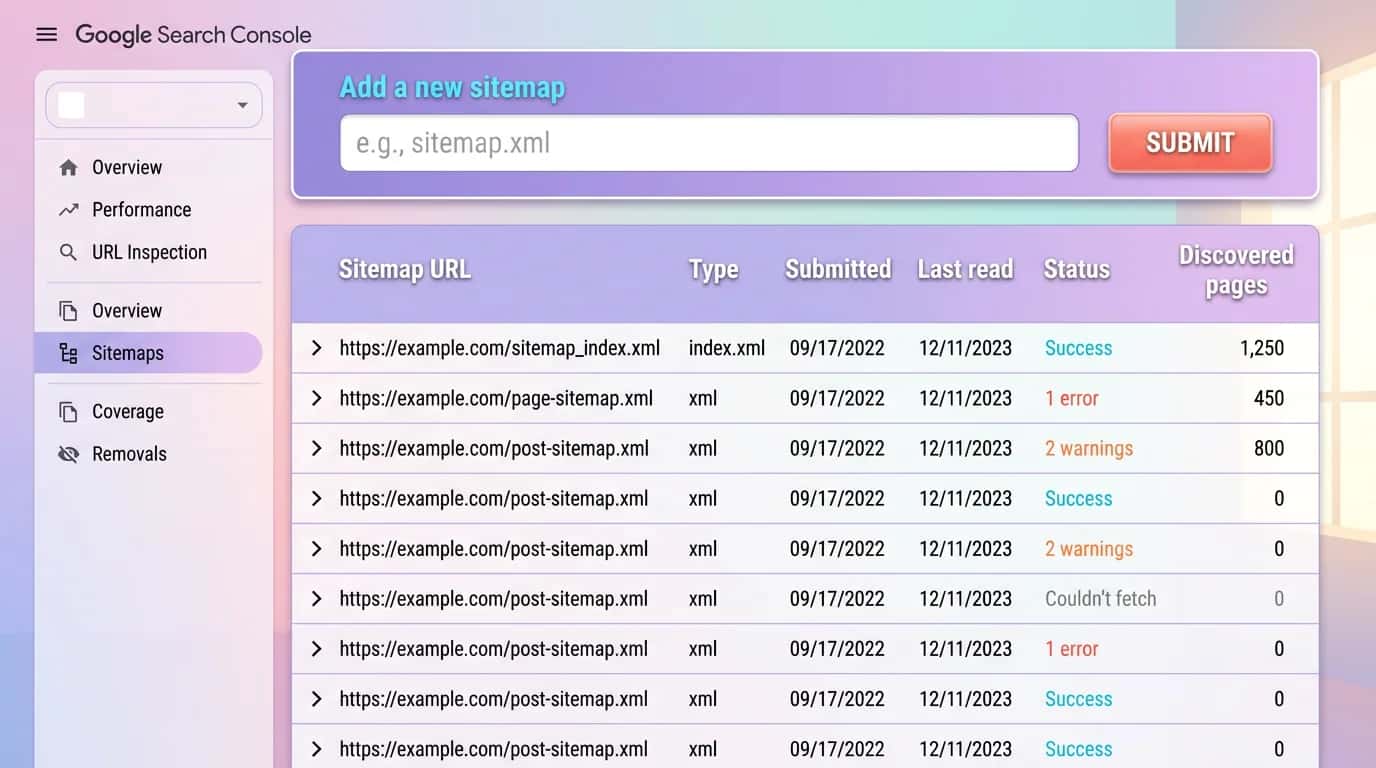
The best indicator is not the successful reading message. You need to monitor consistency between submitted URLs, URLs actually indexed and the exclusions reported by Google. A healthy sitemap produces few surprises: no 404 errors, few redirects, logical canonical tags and coverage that grows as useful content enters the index.
If Search Console shows many pages as discovered, currently not indexed, the sitemap itself is not necessarily at fault. This often reveals too many weak catalogue pages, duplicate descriptions, a slow server or poor internal linking. Conversely, if priority pages remain invisible despite appearing in the file, you should examine their editorial quality, internal authority and technical signals.
We tracked a typical case on an 86-page small business website. Nineteen URLs appeared in the sitemap but remained excluded as duplicates without a user-selected canonical. The problem was caused by duplicated legacy templates, not the XML file. Once the templates had been rationalised and the internal linking tightened, 14 of those 19 pages were indexed in under a month. The sitemap acted as a warning system, not a miracle cure.
| 01Signal | 02What to examine | 03What it reveals | 04Priority action |
|---|---|---|---|
| 01Sitemap read successfully | Google accepted the download | The file is accessible | Move on to analysing the submitted URLs |
| 02Gap between submitted and indexed URLs | Far fewer pages indexed than submitted | Weak quality, duplication or unclear search intent | Audit the templates and the genuine value of each page |
| 03URLs excluded by noindex | Pages in the file that have deliberately been made non-indexable | An inconsistent sitemap | Remove these URLs from the generator |
| 04Redirects or 404 errors | Old pages that are still listed | Technical debt or an incomplete migration | Clean up the paths and regenerate the sitemap |
| 05Discovered, not currently indexed | Google knows the URL but is slow to index it | Low SEO priority or an excessively large website | Strengthen internal linking and content quality |
| 06Sudden drop in valid pages | A sharp decline after an update | Plugin fault, robots block or incorrect domain | Compare the before and after states, then check robots.txt |
Sitemap read successfully
Gap between submitted and indexed URLs
URLs excluded by noindex
Redirects or 404 errors
Discovered, not currently indexed
Sudden drop in valid pages
The native WordPress generator is often enough for a clean brochure website with few content types and a simple publishing strategy. It handles the basics without complicated configuration. As the website grows, its limitations quickly become apparent: you need to decide which taxonomies to index, exclude certain authors, manage WooCommerce or apply more precise rules. That is when an SEO plugin or custom logic becomes worthwhile.
If you have fewer than a few hundred URLs, few unwanted archives and no specific business requirements, using the native feature avoids overloading the ecosystem. It keeps the technical stack lean. This option suits a small business that mainly publishes corporate pages and a handful of articles. In that case, the wider consistency between content, performance and strategic pages matters more than the sitemap itself. To take this further, read Seven SEO Tools for SMEs in 2026.
Yoast SEO and Rank Math make it easier to exclude taxonomies, media or authors (source: Yoast, 2025) (source: Rank Math, 2025). On an ecommerce website or a content-rich blog, this control prevents Google from being overwhelmed by unnecessary archives. You should, however, keep a single SEO controller. When a caching plugin, WooCommerce and an SEO plugin each produce their own rules, WordPress sitemaps quickly become inconsistent.
A custom solution becomes relevant if you manage thousands of URLs, several languages, a multisite network or business-specific segmentation rules. In that situation, the sitemap forms part of a broader SEO architecture alongside internal links, pagination and redirects. Before taking this route, make sure that your publishing structure and technology stack are stable. On a project in transition, reading our WordPress migration guide will often prevent you from coding the wrong behaviour too early.
We audit your WordPress sitemaps, indexable URLs and Search Console settings to remove technical noise and put the right pages back at the centre of your SEO strategy.
Last updated: April 2026
Keep exploring



A project in mind?
Start with a free audit grounded in your goals, website and data.
Discutons de votre projet
30 min · Google Meet
Choisissez le créneau qui vous convient dans notre calendrier. On analyse votre situation avant l’appel pour aller droit au but.
Finding available times...