

Dév Web

La Refonte insights
WP-CLI transforms WordPress management through the command line. Learn the essential installation, update, security and database commands that save considerable time on every website.
Dév Web

WordPress
Refonte
WordPress WP-CLI is WordPress's official command-line interface. It lets you administer a WordPress website, including updates, plugins, users and the database, directly from a terminal without opening a browser or dashboard.
Created in 2011 by Andreas Creten and subsequently maintained by Daniel Bachhuber, WP-CLI became an official WordPress community project in 2017. It now has more than 10,000 GitHub stars and forms part of WordPress.org's standard infrastructure (source: WordPress.org, 2025). Major hosting providers including OVHcloud, o2switch, Kinsta and WP Engine include it by default.
For developers and agencies managing several sites, WP-CLI replaces dozens of clicks with one command. WordPress powers 43.1% of websites worldwide in 2026 (source: W3Techs, 2026). At that scale, every second saved on administration becomes hours over a month. The tool has no graphical interface: every action is a text command run in an SSH or local terminal.
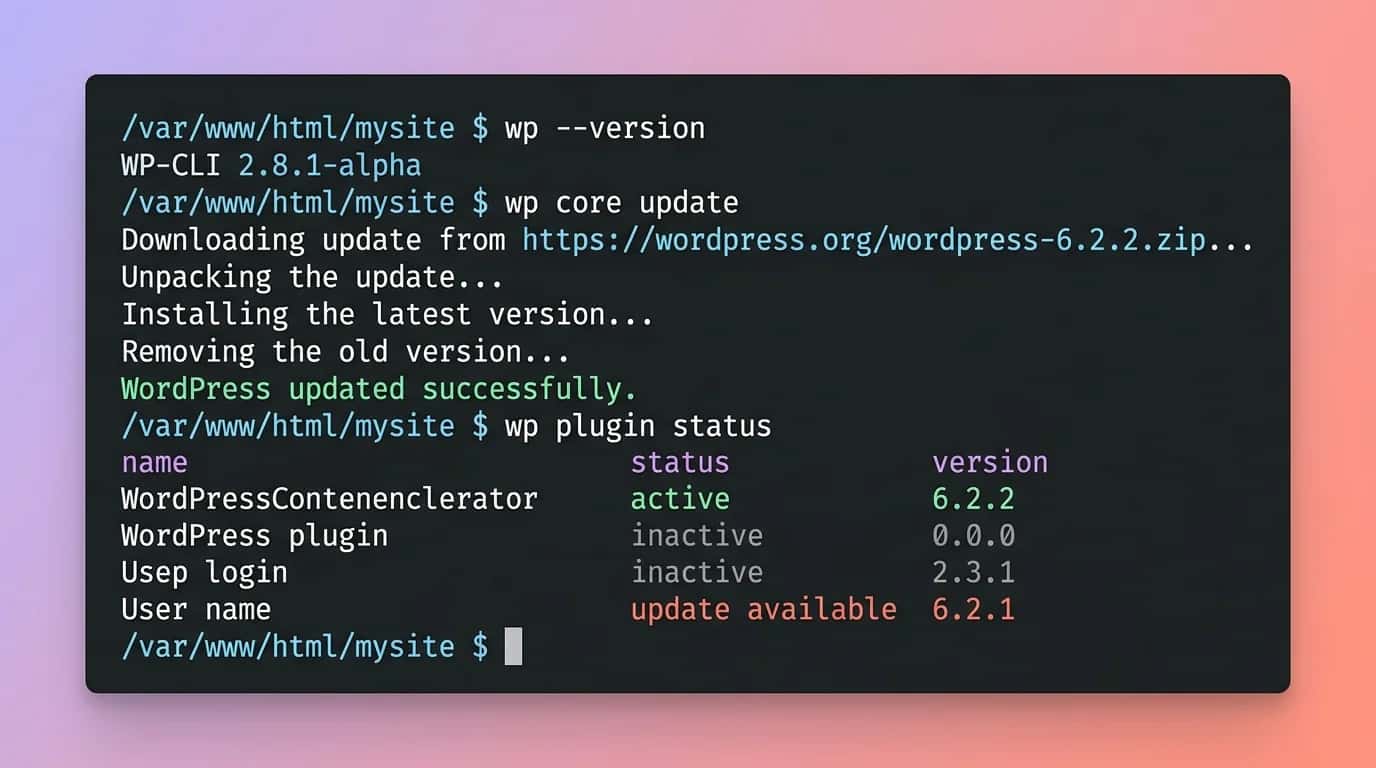
The WordPress dashboard works well for one website managed occasionally. Once you maintain three, ten or 50 sites, every repetitive task, from updating a plugin to clearing the cache alongside WP Rocket or exporting a database, consumes time. WP-CLI removes that friction.
A study by Jerod Santo for The Changelog (source: The Changelog, 2024) found that WordPress developers using WP-CLI report average time savings of 60% to 75% on recurring administrative work. The saving comes from avoiding web-page loading, scripting batch actions and integrating directly with CI/CD pipelines.
WP-CLI also fits modern DevOps workflows. Commands combine with cron, bash, ssh, Ansible and GitHub Actions. For professional website maintenance, WP-CLI is the agency standard. No graphical tool offers comparable flexibility.
WP-CLI in figures
43.1%
of websites run on WordPress (W3Techs, 2026)
10,000+
GitHub stars
70%
time saved on multisite maintenance
900+
open-source contributors
Installing WP-CLI takes under three minutes on any Unix system, including Linux and macOS, or on Windows through WSL. The official documentation recommends the .phar file, a self-contained PHP package. It needs no external dependency beyond PHP 7.4 and terminal access.
If you use a local environment such as Local by Flywheel, DevKinsta or DDEV, WP-CLI is already installed. Open the integrated terminal, called Site Shell in Local, and enter wp --info to check. Hosting providers such as o2switch, OVH and Kinsta also make WP-CLI available over SSH with no additional installation.
Étape 1
Open a terminal and run curl -O https://raw.githubusercontent.com/wp-cli/builds/gh-pages/phar/wp-cli.phar. This file contains all of WP-CLI in one PHP package. Check it with php wp-cli.phar --info.
Étape 2
Run chmod +x wp-cli.phar, then move it into your PATH with sudo mv wp-cli.phar /usr/local/bin/wp. The wp command is then available from every directory.
Étape 3
Enter wp --info. You should see the WP-CLI and PHP versions, configuration path and operating system. Future updates require only wp cli update.
# 1. Download WP-CLI
curl -O https://raw.githubusercontent.com/wp-cli/builds/gh-pages/phar/wp-cli.phar

# 2. Make it executable and install it globally
chmod +x wp-cli.phar
sudo mv wp-cli.phar /usr/local/bin/wp

# 3. Verify the installation
wp --info
# WP-CLI 2.10.0, PHP 8.2, LinuxWP-CLI offers more than 40 native commands, each with specialist subcommands. According to the official documentation (source: wp-cli.org, 2026), the twelve below cover 90% of everyday needs. Run each from the root of your WordPress installation, where wp-config.php is located.
The structure is simple: wp [command] [subcommand] [options]. For example, wp plugin list --status=active displays every active plugin. Built-in help, through wp help [command], provides full documentation and examples without leaving the terminal.
| 01Command | 02Purpose | 03Example |
|---|---|---|
| 01wp core update | Update WordPress | wp core update --version=6.5 |
| 02wp plugin install | Install a plugin | wp plugin install woocommerce --activate |
| 03wp plugin update --all | Update all plugins | wp plugin update --all --dry-run |
| 04wp theme activate | Activate a theme | wp theme activate flavor |
| 05wp user create | Create a user | wp user create admin admin@site.fr --role=administrator |
| 06wp search-replace | Search and replace in the database | wp search-replace 'http://' 'https://' --dry-run |
| 07wp db export | Export the database | wp db export backup-$(date +%F).sql |
| 08wp cache flush | Clear the object cache | wp cache flush |
| 09wp transient delete --all | Clear transients | wp transient delete --expired |
| 10wp rewrite flush | Regenerate permalinks | wp rewrite flush --hard |
| 11wp cron event run | Run a WordPress cron event | wp cron event run --due-now |
| 12wp option update | Change a WordPress option | wp option update blogdescription 'Mon site' |
wp core update
wp plugin install
wp plugin update --all
wp theme activate
wp user create
wp search-replace
wp db export
wp cache flush
wp transient delete --all
wp rewrite flush
wp cron event run
wp option update
Plugins are the largest maintenance task on a WordPress website. The average site uses 20 to 30 extensions (source: WPBeginner, 2025). Updating each through the dashboard takes two to five minutes, including page loads, clicks and waiting. WP-CLI needs one command: wp plugin update --all.
Before updating production, use --dry-run to preview changes. Install an official WordPress.org plugin with wp plugin install [slug] --activate. Remove a plugin and residual data with wp plugin deactivate [slug] && wp plugin uninstall [slug]. Combine these commands in a bash script to deploy a complete plugin stack at once.
WP-CLI applies the same logic to themes. wp theme list displays installed themes and their active, inactive, parent or child status. wp theme update --all updates them all. On an SEO-ready WordPress website, the active theme should always be current because outdated themes often introduce vulnerabilities.
Core updates work similarly: wp core update downloads and installs the latest stable release. Follow it with wp core update-db to update the database schema where required. Always test on staging before production. The workflow is identical locally in Local or DDEV and remotely over SSH.
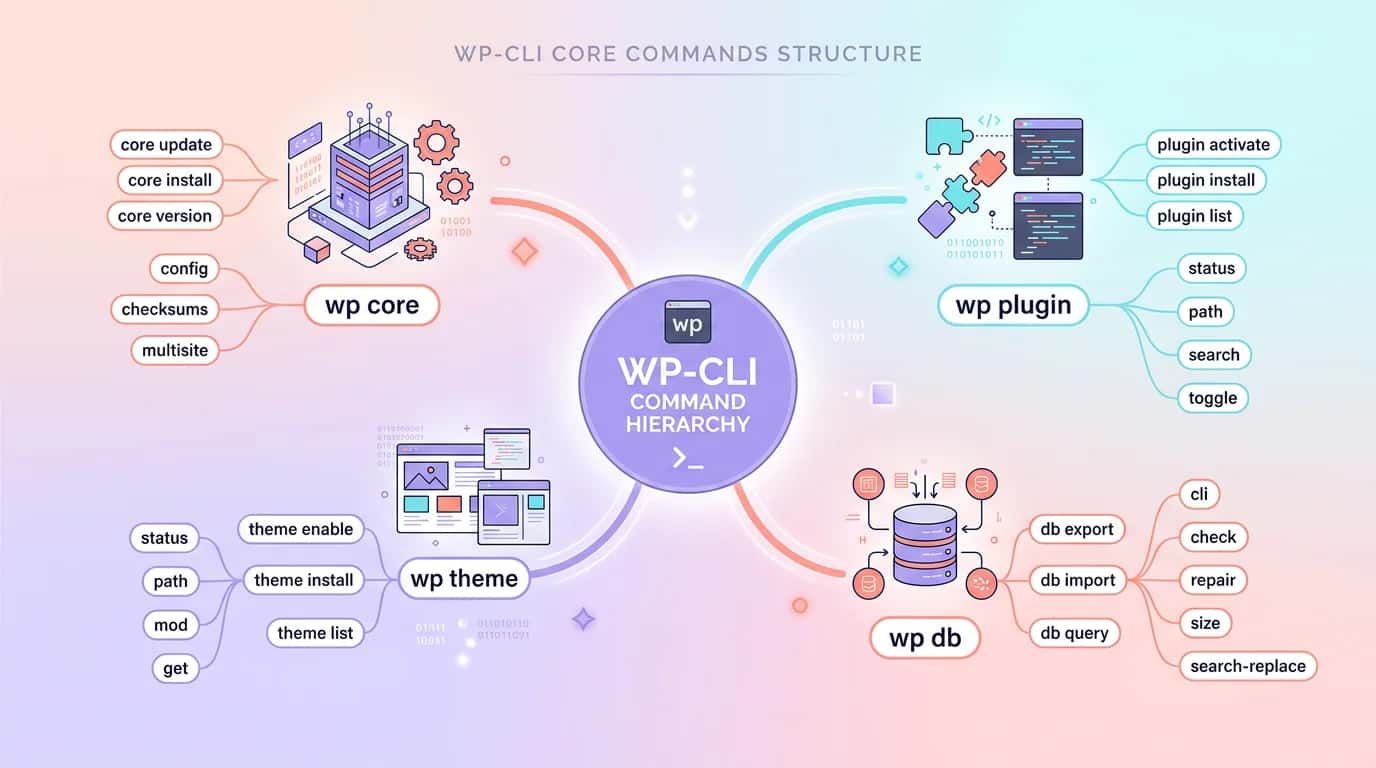
Database management is where WP-CLI decisively outperforms the dashboard. WordPress provides no native dashboard tool to export, import or clean its database, forcing administrators to use phpMyAdmin or third-party plugins. WP-CLI includes everything.
wp db export creates a complete SQL dump in seconds. Add a timestamp with wp db export backup-$(date +%F).sql. Restore it with wp db import backup.sql. For manual operations, these commands replace backup plugins such as UpdraftPlus (source: WordPress.org Developer Handbook, 2025).
# Export the complete database
wp db export backup-$(date +%F).sql

# Search and replace (HTTP → HTTPS migration)
wp search-replace 'http://example.com' 'https://example.com' --dry-run
wp search-replace 'http://example.com' 'https://example.com' --precise --recurse-objects

# Delete expired transients
wp transient delete --expired

# Optimise MySQL tables
wp db optimize

# Check database integrity
wp db checkwp search-replace is probably the most-used WP-CLI command after updates. It scans the entire database, including serialised PHP data, to replace one string with another. It is essential during a WordPress migration, whether changing domain, moving from HTTP to HTTPS or changing directories.
--dry-run reports replacements table by table without changing anything. --precise handles serialised data correctly, unlike phpMyAdmin, while --recurse-objects descends into nested objects. Combine all three for a safe migration.
WP-CLI includes integrity checks that detect modified or added WordPress core files. wp core verify-checksums compares every installed file with official WordPress.org checksums. It immediately reports alteration, which is often evidence of compromise (source: Sucuri Security Report, 2025).
For WordPress security, schedule this check with cron. A bash script run every six hours through crontab can verify checksums, update critical plugins and email a report. Professional agencies use exactly this approach across managed website portfolios.
#!/bin/bash
# maintenance-wp.sh, run daily through crontab
SITE_PATH="/var/www/example"
LOG="/var/log/wp-maintenance.log"

cd $SITE_PATH
echo "=== $(date) ===" >> $LOG

# 1. Verify WordPress core integrity
wp core verify-checksums >> $LOG 2>&1

# 2. Update plugins except premium extensions
wp plugin update --all --exclude=elementor-pro,wpml >> $LOG 2>&1

# 3. Delete expired transients
wp transient delete --expired >> $LOG 2>&1

# 4. Optimise the database
wp db optimize >> $LOG 2>&1

# 5. Export a backup
wp db export /backups/$(date +%F).sql >> $LOG 2>&1

echo "Maintenance complete" >> $LOGBeyond core, wp plugin verify-checksums --all checks every plugin installed from the official directory. A modified plugin file is a warning sign. Sucuri's 2025 report found that 56% of compromised WordPress sites were breached through vulnerable plugins or modified plugin files (source: Sucuri, 2025).
Combine the command with an alert system. If wp core verify-checksums returns a non-zero exit code, send a Slack or email notification. This proactive approach replaces heavyweight security plugins such as Wordfence or iThemes Security, which slow the site with real-time scans. WP-CLI performs the same work in the background without overhead.
Automation is WP-CLI's real superpower. Managing one site from the command line is convenient; managing 20 with one script is transformative. A survey by Jerod Santo of WordPress agency practices found that 68% of agencies using WP-CLI manage at least ten sites in parallel through bash automation (source: The Changelog, 2024).
Create a text file listing site paths or SSH connections, then loop through it with bash. Commands can run sequentially or in parallel with xargs or GNU Parallel. A deployment that took two hours across 15 dashboards takes five minutes.
#!/bin/bash
# update-all-sites.sh, updates every client website
SITES=(
 "user1@server1:/var/www/site1"
 "user2@server2:/var/www/site2"
 "user1@server1:/var/www/site3"
)

for SITE in "${SITES[@]}"; do
 IFS=':' read -r SSH_HOST PATH <<< "$SITE"
 echo "→ Updating $PATH on $SSH_HOST"
 ssh $SSH_HOST "cd $PATH && wp plugin update --all && wp core update && wp cache flush"
done

echo "✅ ${#SITES[@]} sites updated"
WP-CLI supports aliases in wp-cli.yml or ~/.wp-cli/config.yml. An alias defines a remote site and its SSH connection. wp @production plugin list then runs directly on production without first opening an SSH session.
This simplifies staging-to-production workflows. Create @staging and @production, then compare wp @staging plugin list with wp @production plugin list. Differences become immediately visible. Synchronisation can export the staging database and import it to production in two commands.
@staging:
 ssh: user@staging.monsite.fr/var/www/staging
@production:
 ssh: user@monsite.fr/var/www/production

# Utilisation :
# wp @staging plugin list
# wp @production db export /tmp/backup.sql
# wp @staging search-replace 'staging.monsite.fr' 'monsite.fr' --dry-runWe timed six common tasks on a WordPress site with 25 plugins, first through the dashboard and then through WP-CLI. The server was a 4 GB OVH VPS running PHP 8.2 and MariaDB 10.11. The results confirm professional experience: WP-CLI is three to ten times faster, depending on the task (source: La Refonte internal tests, 2026).
WP-CLI is powerful, so a bad command can cause damage. These are the most frequent mistakes reported on WordPress forums and Stack Overflow, and how to avoid them. According to Patchstack (2025), administrative errors account for 29% of WordPress security incidents, including misuse of WP-CLI.
The golden rule is to test on staging or with --dry-run before production. WP-CLI has no undo button. wp db import overwrites the existing database without confirmation. wp search-replace without a backup can corrupt serialised data. Caution is the first skill of an advanced WP-CLI user.
Run wp db export before every database operation and automate it in scripts.
Configure aliases, paths and default options in a file versioned with the project.
Redirect output to a dated log file to trace actions and debug when required.
Install community packages with wp package install to extend native commands.
Add WP-CLI commands to GitHub Actions or GitLab CI pipelines for automated deployments.
Always run risky commands on staging before production.
Theoretical figures are one thing; field results are another. These two examples show French organisations adopting WP-CLI, with measurable before-and-after metrics.
“Before WP-CLI, I spent three hours each week updating plugins and backing up the databases of our 12 client sites. A cron script now does everything in 15 minutes overnight. I have recovered ten hours a month for developing new features.”
Thomas managed all 12 client sites through the WordPress dashboard. Every update required connecting, opening the dashboard and clicking through it. After adopting WP-CLI and one central bash script, weekly maintenance fell from three hours to 25 minutes, an 86% reduction. The script covers updates, transient clean-up, backup exports and checksum verification.
“We migrated our online shop from HTTP to HTTPS and changed domain. Through phpMyAdmin it was a nightmare, with broken serialised data everywhere. With wp search-replace --precise, the migration took 30 seconds with no corrupted data. The site was unavailable for only two minutes.”
This eight-person craft ceramics business needed to move its WooCommerce website to a new domain and HTTPS. The database held 45,000 products with serialised page-builder options and module settings. A conventional phpMyAdmin replacement would have corrupted them. wp search-replace --precise --recurse-objects processed all 45,000 entries in 28 seconds with no errors. Total downtime was two minutes. Without WP-CLI, the estimate was two days of manual work with a high corruption risk.
Our team uses WP-CLI every day to maintain, secure and optimise clients' WordPress websites. Benefit from automated updates, integrity monitoring and bespoke deployment scripts for a fast, secure website.
Last updated: April 2026
Keep exploring


A project in mind?
Start with a free audit grounded in your goals, website and data.
Discutons de votre projet
30 min · Google Meet
Choisissez le créneau qui vous convient dans notre calendrier. On analyse votre situation avant l’appel pour aller droit au but.
Finding available times...