

Refonte

La Refonte insights
Store Commander transforms the way you manage a PrestaShop store. Explore its features, pricing and our practical findings to save time on back-office work.
Refonte

PrestaShop

SEO
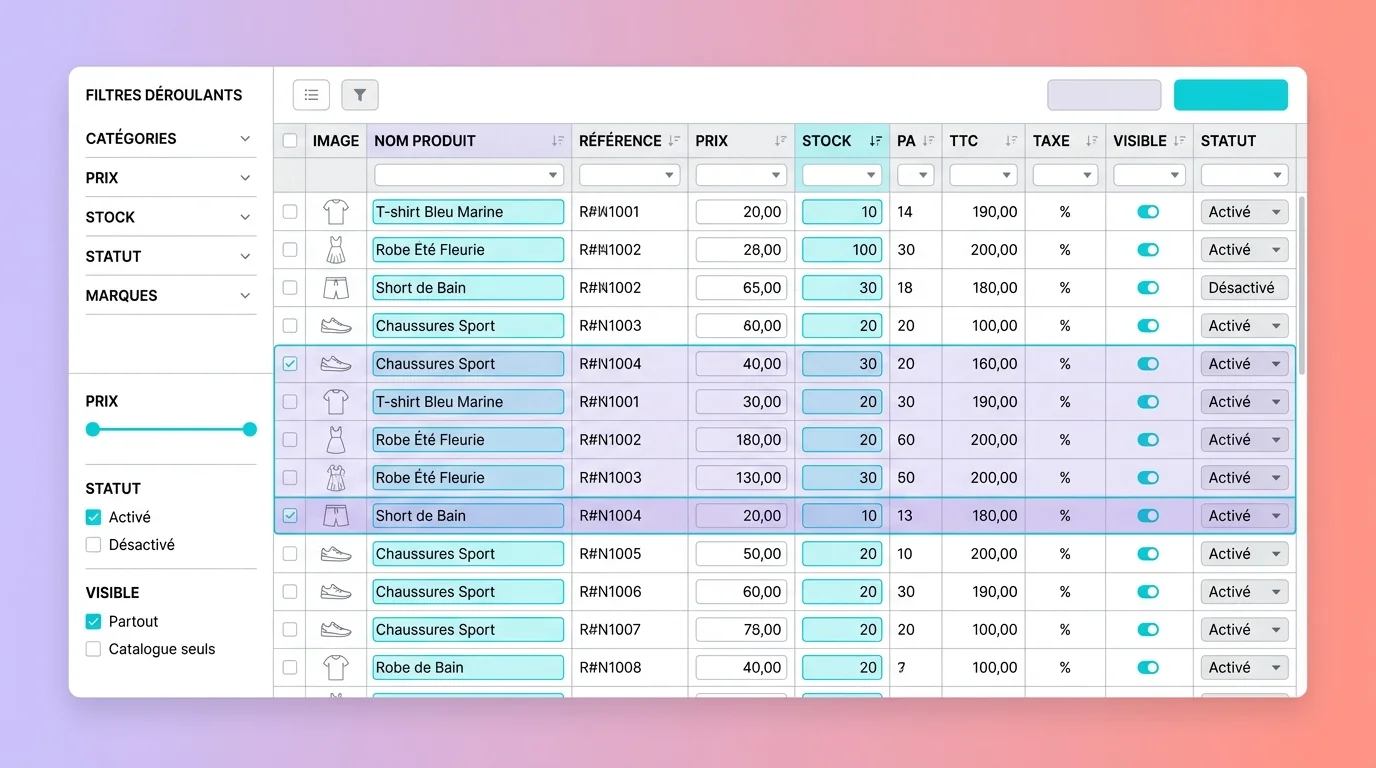
Store Commander for PrestaShop is a back-office management module that replaces the native interface with an online spreadsheet. It lets you edit products, categories, orders and customers in bulk, directly in your browser and without exporting CSV files.
Developed in France since 2009, the module is used by more than 30,000 PrestaShop stores worldwide (source: Store Commander, 2025). Its principle is simple: all your data appear in editable columns, like an Excel spreadsheet connected to your database. Select 500 products, change the price in one click and the update is applied instantly.
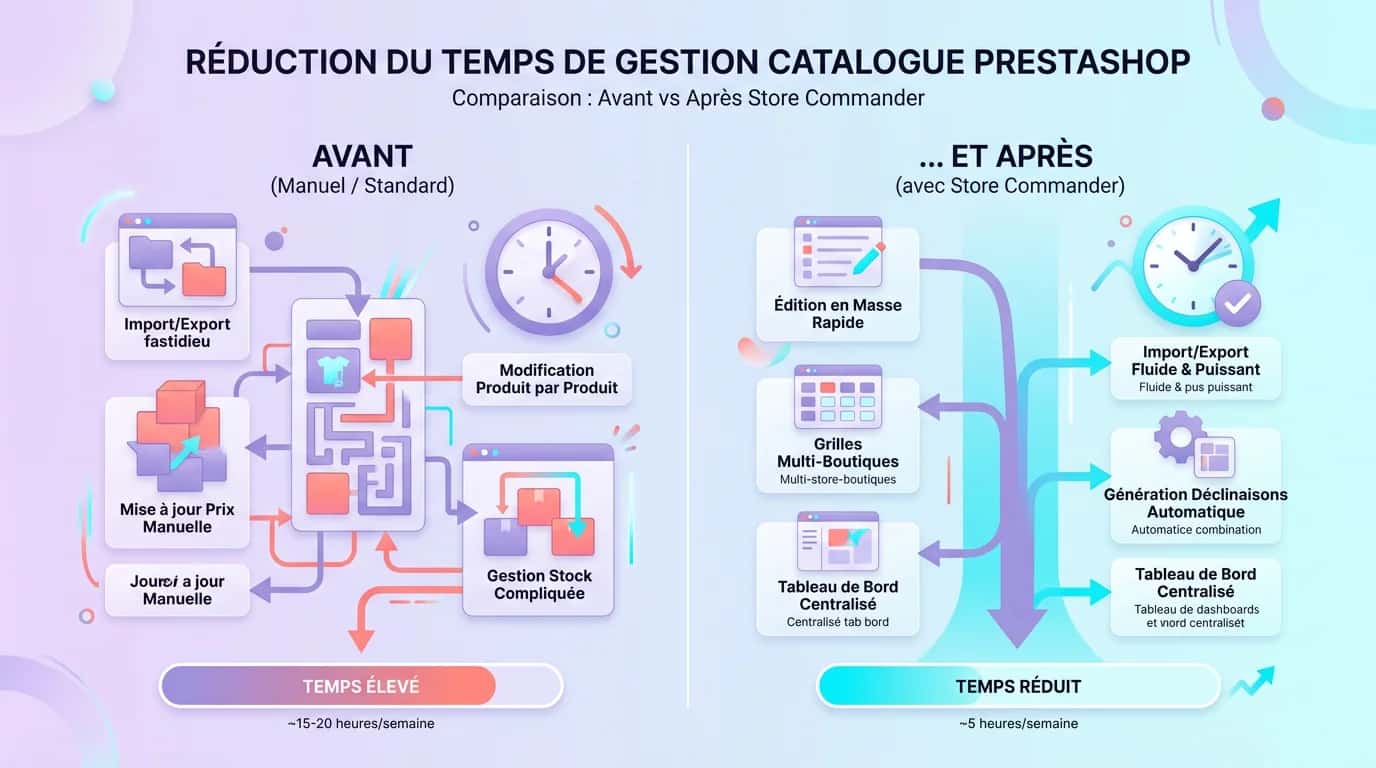
PrestaShop's native back office requires each product page to be opened individually, an operation that takes two to three minutes per SKU (source: PrestaShop Addons, 2024). For a catalogue of 5,000 products, seasonal updates become a logistical headache. Store Commander solves the problem by bringing catalogue management, complementary PrestaShop modules and order tracking together in one window.
Users report an average 60% time saving on recurring back-office tasks (source: Store Commander, 2025). For online retailers managing more than 1,000 SKUs, the module becomes a core everyday tool. For a practical continuation, see Task Automation.
Store Commander in figures
30,000+
Stores using it worldwide
15 years
In operation, since its 2009 launch
-60%
Average catalogue management time
100%
Developed and supported in France
PrestaShop's native back office covers basic requirements, but its limitations become clear once a catalogue exceeds 500 SKUs. According to BuiltWith (2025), 42% of active PrestaShop stores exceed this threshold. Store Commander adds five important features that the standard back office does not provide. Each addresses a specific frustration reported by online retailers on the official PrestaShop forum (source: PrestaShop Community, 2025).
Select hundreds of products and change prices, stock levels, descriptions or categories in one click. No more opening product pages one by one.
Import CSV or Excel files with intelligent column mapping. Export filtered data for external analysis or accounting.
Create and edit size, colour and material combinations directly in the spreadsheet. Add 200 combinations in five minutes instead of two hours.
Manage several PrestaShop stores from a single interface. Synchronise prices or vary them by store to suit your strategy.
Find any product in three seconds using filters you can combine: category, supplier, stock, price, status and brand.
Étape 1
Choose the plan that suits your catalogue: Lite, Standard or Pro. Payment gives you immediate access to the module's ZIP file. Check compatibility with your version of PrestaShop before buying.
Étape 2
In your PrestaShop back office, go to Modules > Add a module. Upload the ZIP file you downloaded. Installation takes less than 30 seconds and requires no database work.
Étape 3
Enter your licence key in the module settings. Customise the columns shown: hide those you do not need and reorder the rest to match your daily workflow.
Étape 4
Select a category, filter by stock or price, then edit cells directly. Save your work. Changes appear in the front office immediately, with no cache purge required.
For a module such as Store Commander, a video is often more informative than a long marketing promise. Before buying, watch an official demonstration or short screencast and focus on three points: the actual speed of bulk editing, the clarity of the filters and multistore management. If the demonstration shows only a few clicks with no populated catalogue or product variants, it does not reflect everyday use.
The most useful demonstration will resemble your own circumstances: changing hundreds of prices, updating stock, combining filters and navigating between categories and combinations. The aim is not to decide whether the interface looks attractive, but whether it genuinely reduces the number of actions required. For a closer look, watch the official Store Commander demonstration in the developer's video library and compare it with your current back-office tasks.
Store Commander is sold as an annual subscription. Three plans are available, each adding features to the previous tier. The prices below were publicly displayed on the official website in March 2026 (source: storecommander.com, 2026). The subscription includes updates and technical support, with no hidden charges or sales commission.
For an SME managing a catalogue of 1,000 to 5,000 SKUs, Standard provides the best balance of features and price. Above 5,000 SKUs, or for multistore operations, Pro can pay for itself within the first month through time saved on bulk PrestaShop catalogue updates.
| 01Plan | 02Price excluding VAT/year | 03Key features | 04Best suited to |
|---|---|---|---|
| 01Lite | ~€300 | Bulk editing, filters and CSV export | Microbusinesses with fewer than 500 products |
| 02Standard | ~€450 | Lite plus combinations, advanced import and images | SMEs with 500 to 5,000 products |
| 03Pro | ~€600 | Standard plus multistore, API and scripts | Online stores with more than 5,000 SKUs |
Lite
Standard
Pro
The marketing figures on the official website are not enough to assess a tool. Here are two examples from SMEs supported by our PrestaShop agency that integrated Store Commander into their daily workflow. The results illustrate the module's real impact on catalogues of different sizes.
The first is a fashion retailer with six employees and 3,200 SKUs. Before Store Commander, catalogue updates took 12 hours a week. Each seasonal price change required three full days. Following deployment, the same operations take three hours a week, a 75% saving. Seasonal updates are completed in four hours.
The second is an office supplies wholesaler with 8,000 SKUs. One full-time employee was dedicated to the PrestaShop back office. After Store Commander was installed, they recovered 60% of their time, which was reassigned to customer service. The data-entry error rate, including duplicates and incorrect prices, fell from 3% to almost zero thanks to the integrated detection filters.
We have used Store Commander on our clients' PrestaShop projects since 2023. After more than 15 deployments, this is our objective assessment. Online reviews on PrestaShop Addons support our findings, with an average rating of 4.5/5 from more than 200 reviews (source: PrestaShop Addons, 2025). Its strengths are widely recognised. The limitations, mentioned less often, are worth understanding before purchase.
Store Commander is not the only back-office management module for PrestaShop. Alternatives include PrestaShop's native CSV import module, which is free but limited to basic imports, products such as Merlin Backoffice and ERP connectors for Cegid or Sage. According to Statista (2025), 67% of European online retailers use at least one third-party tool to manage their catalogue.
Store Commander stands out in one particular area: visual bulk editing without leaving the browser. If your main requirement is to update hundreds of product pages, prices, stock levels, descriptions or images quickly, it is the most productive option in the PrestaShop market. If you need to automate flows between your ERP and your store, a dedicated connector will be more suitable. The two approaches complement one another.
For a complete PrestaShop deployment, combining Store Commander with a structured e-commerce rebuild strategy maximises return on investment. A catalogue-management tool does not replace a sound technical architecture; it accelerates it.
“We used to spend two days every month updating our 3,200 product pages. With Store Commander, it is finished in a morning. The benefit is so obvious that we cannot imagine how we managed before.”
Our PrestaShop developers install, configure and optimise Store Commander for your store. A free audit of your back-office workflow is included.
Last updated: March 2026
Keep exploring


A project in mind?
Start with a free audit grounded in your goals, website and data.
Discutons de votre projet
30 min · Google Meet
Choisissez le créneau qui vous convient dans notre calendrier. On analyse votre situation avant l’appel pour aller droit au but.
Finding available times...